
Nginxのキャッシュをブラウザから管理できるcache purgeモジュールの導入方法です。
ダウンロードディレクトリの作成
# mkdir /usr/local/src/nginx
# cd /usr/local/src/nginx
今回はNginx1.6.0版を選択。
# wget http://nginx.org/download/nginx-1.6.0.tar.gz
モジュールをダウンロード
ついでにopensslも。
# wget http://labs.frickle.com/files/ngx_cache_purge-2.1.tar.gz
# wget http://www.openssl.org/source/openssl-1.0.1g.tar.gz
展開します。
# tar xvzf nginx-1.6.0.tar.gz
# tar xvzf openssl-1.0.1g.tar.gz
# tar xvzf ngx_cache_purge-2.1.tar.gz
目次
Nginxのcache purge付きインストール
Nginxのディレクトリに移動します。
# cd nginx-1.6.0
コンフィギュア。環境に合わせて下さい。
# ./configure --prefix=/usr/local/nginx-1.6.0 --sbin-path=/usr/local/sbin/nginx --conf-path=/etc/nginx/nginx.conf --error-log-path=/var/log/nginx/error.log --http-log-path=/var/log/nginx/access.log --http-client-body-temp-path=/var/lib/nginx/tmp/client_body --http-proxy-temp-path=/var/lib/nginx/tmp/proxy --http-fastcgi-temp-path=/var/lib/nginx/tmp/fastcgi --http-uwsgi-temp-path=/var/lib/nginx/tmp/uwsgi --http-scgi-temp-path=/var/lib/nginx/tmp/scgi --pid-path=/var/run/nginx.pid --lock-path=/var/lock/subsys/nginx --user=nginx --group=nginx --with-file-aio --with-ipv6 --with-http_ssl_module --with-http_realip_module --with-http_addition_module --with-http_xslt_module --with-http_image_filter_module --with-http_sub_module --with-http_dav_module --with-http_flv_module --with-http_mp4_module --with-http_gzip_static_module --with-http_random_index_module --with-http_secure_link_module --with-http_degradation_module --with-http_stub_status_module --with-mail --with-mail_ssl_module --with-cc-opt='-O2 -g -pipe -Wall -Wp,-D_FORTIFY_SOURCE=2 -fexceptions -fstack-protector --param=ssp-buffer-size=4 -m64 -mtune=generic' --with-ld-opt=-Wl,-E --with-openssl=/usr/local/src/nginx/openssl-1.0.1g --add-module=/usr/local/src/nginx/ngx_cache_purge-2.1
インストール
# make && make install
シンボリックリンクを張ります。
# ln -s /usr/local/nginx-1.6.1 /usr/local/nginx
構文チェック
# /usr/local/sbin/nginx -t

nginx: the configuration file /etc/nginx/nginx.conf syntax is ok
nginx: [emerg] mkdir() "/var/lib/nginx/tmp/client_body" failed (2: No such file or directory)
nginx: configuration file /etc/nginx/nginx.conf test failed
なにやらエラーが出てますね。
ディレクトリを作ってあげます。
# mkdir -p /var/lib/nginx/tmp/client_body
nginxユーザ作成
# groupadd nginx
# useradd -g nginx nginx
# usermod -s /bin/false nginx
改めて構文チェックを行います。
# nginx -t
nginx: the configuration file /etc/nginx/nginx.conf syntax is ok
nginx: configuration file /etc/nginx/nginx.conf test is successful
Nginx起動スクリプト作成
# vi /etc/init.d/nginx


#!/bin/sh
#
# nginx - this script starts and stops the nginx daemon
#
# chkconfig:   - 85 15
# description:  Nginx is an HTTP(S) server, HTTP(S) reverse \
#               proxy and IMAP/POP3 proxy server
# processname: nginx
# config:      /etc/nginx/nginx.conf
# config:      /etc/sysconfig/nginx
# pidfile:     /var/run/nginx.pid

# Source function library.
. /etc/rc.d/init.d/functions

# Source networking configuration.
. /etc/sysconfig/network

# Check that networking is up.
[ "$NETWORKING" = "no" ] && exit 0

#nginx="/usr/sbin/nginx"
nginx=${NGINX-/usr/local/sbin/nginx}
prog=$(basename $nginx)

sysconfig="/etc/sysconfig/$prog"
lockfile="/var/lock/subsys/nginx"
pidfile="/var/run/${prog}.pid"

NGINX_CONF_FILE="/etc/nginx/nginx.conf"

[ -f $sysconfig ] && . $sysconfig


start() {
    [ -x $nginx ] || exit 5
    [ -f $NGINX_CONF_FILE ] || exit 6
    echo -n $"Starting $prog: "
    daemon $nginx -c $NGINX_CONF_FILE
    retval=$?
    echo
    [ $retval -eq 0 ] && touch $lockfile
    return $retval
}

stop() {
    echo -n $"Stopping $prog: "
    killproc -p $pidfile $prog
    retval=$?
    echo
    [ $retval -eq 0 ] && rm -f $lockfile
    return $retval
}

restart() {
    configtest_q || return 6
    stop
    start
}

reload() {
    configtest_q || return 6
    echo -n $"Reloading $prog: "
    killproc -p $pidfile $prog -HUP
    echo
}

configtest() {
    $nginx -t -c $NGINX_CONF_FILE
}

configtest_q() {
    $nginx -t -q -c $NGINX_CONF_FILE
}

rh_status() {
    status $prog
}

rh_status_q() {
    rh_status >/dev/null 2>&1
}

# Upgrade the binary with no downtime.
upgrade() {
    local oldbin_pidfile="${pidfile}.oldbin"

    configtest_q || return 6
    echo -n $"Upgrading $prog: "
    killproc -p $pidfile $prog -USR2
    retval=$?
    sleep 1
    if [[ -f ${oldbin_pidfile} && -f ${pidfile} ]];  then
        killproc -p $oldbin_pidfile $prog -QUIT
        success $"$prog online upgrade"
        echo
        return 0
    else
        failure $"$prog online upgrade"
        echo
        return 1
    fi
}

# Tell nginx to reopen logs
reopen_logs() {
    configtest_q || return 6
    echo -n $"Reopening $prog logs: "
    killproc -p $pidfile $prog -USR1
    retval=$?
    echo
    return $retval
}

case "$1" in
    start)
        rh_status_q && exit 0
        $1
        ;;
    stop)
        rh_status_q || exit 0
        $1
        ;;
    restart|configtest|reopen_logs)
        $1
        ;;
    force-reload|upgrade)
        rh_status_q || exit 7
        upgrade
        ;;
    reload)
        rh_status_q || exit 7
        $1
        ;;
    status|status_q)
        rh_$1
        ;;
    condrestart|try-restart)
        rh_status_q || exit 7
        restart
            ;;
    *)
        echo $"Usage: $0 {start|stop|reload|configtest|status|force-reload|upgrade|restart|reopen_logs}"
        exit 2
esac
実行権限付与して起動させます。
# chmod 711 /etc/init.d/nginx
# /etc/init.d/nginx start
http://サーバーIPアドレス/
動いていることを確認。ひと段落ですね。
# vi /etc/sysconfig/nginx

NGINX=/usr/local/sbin/nginx
Nginx自動起動設定
# chkconfig --add nginx
# chkconfig nginx on

# chkconfig --list nginx
nginx  0:off   1:off   2:on    3:on    4:on    5:on    6:off

# nginx -t
nginx: the configuration file /etc/nginx/nginx.conf syntax is ok
nginx: configuration file /etc/nginx/nginx.conf test is successful
# nginx -v
nginx version: nginx/1.6.0
一応バックアップ
# cp /etc/nginx/nginx.conf /etc/nginx/nginx.conf.org
バーチャルホストのserverディレクティブに以下を挿入して下さい。
       # cache purge
       location ~ /purge(/.*) {
            #allow 127.0.0.1;
            #deny all;
            proxy_cache_purge czone "$scheme://$host$1$is_args$args$mobile";
       }
設定を反映させます。
# /etc/init.d/ngix restart
キャッシュの消し方
消したいURLにアクセスする。
http://サーバIP/purge/削除したいURI
WordPressの管理画面から制御したい Nginx Cache Controllerプラグイン

WordPressのプラグインの新規追加から【Nginx Cache Controller】でインストールが出来ます。
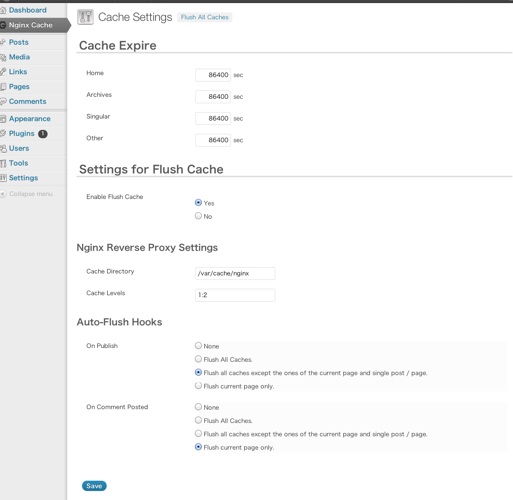 このように管理画面からクリアすることが出来ます。
もう少し詳細に設定出来るものに【Nginx Helper】等あります。自分にとって使いやすいプラグインを探してみるのもいいですね。
なんだか大変そうだなぁと思ったらお問い合わせ下さい。