目次
自動生成されるファイルを一定期間で自動削除したい。
そのままサーバーをほうっておいたらファイルが増加していき、サーバーの容量リソースを圧迫していきます。圧迫しそうな頃合いでログイン後に削除することも可能ですが、ルーティンワークは可能な限りプログラムで自動化していきたいものです。そこでは、findコマンドを使って解決が可能です。
実際の例
現状のディレクトリを確認
[root@localhost syslog]# pwd
/var/www/html/syslog
ディレクトリ上のファイルを確認
[root@localhost syslog]# ls -lah
合計 44M
drwxrwxrwx  4 apache apache 4.0K 11月 25 00:00 2015 .
drwxr-xr-x. 6 root   root   4.0K 11月 25 10:08 2015 ..
-rwxrwxrwx  1 root   root   7.0M 11月 21 23:59 2015 20151121_rtx.log
-rwxrwxrwx  1 root   root   6.3M 11月 22 23:59 2015 20151122_rtx.log
-rwxrwxrwx  1 root   root   7.4M 11月 23 23:59 2015 20151123_rtx.log
-rwxrwxrwx  1 root   root    20M 11月 24 23:59 2015 20151124_rtx.log
-rwxrwxrwx  1 root   root   3.5M 11月 25 10:08 2015 20151125_rtx.log
-rwxrwxrwx  1 root   root   1.3K 11月 24 23:19 2015 erc.php
-rwxrwxrwx  1 root   root    716 11月 24 23:05 2015 index.php
-rwxrwxrwx  1 root   root     23 11月 24 21:12 2015 info.php
-rwxrwxrwx  1 root   root     60 11月 24 23:02 2015 style.css
drwxrwxrwx  7 root   root   4.0K 11月 24 22:47 2015 tablesorter
drwxrwxrwx  2 root   root   4.0K 11月 24 22:47 2015 js
1日過ぎたファイルを表示。
[root@localhost syslog]# find /var/www/html/syslog/ -name '*.log' -mtime +1
/var/www/html/syslog3/20151122_rtx.log
/var/www/html/syslog3/20151121_rtx.log
–deleteオプションを使って実際に実行。
[root@localhost syslog]# find /var/www/html/syslog/ -name '*.log' -mtime +1 -delete
確認。
先程の対象ファイルが消えているはずです。
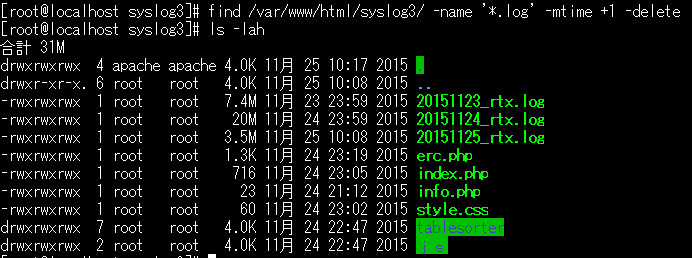
[root@localhost syslog]# ls -lah
合計 31M
drwxrwxrwx  4 apache apache 4.0K 11月 25 10:17 2015 .
drwxr-xr-x. 6 root   root   4.0K 11月 25 10:08 2015 ..
-rwxrwxrwx  1 root   root   7.4M 11月 23 23:59 2015 20151123_rtx.log
-rwxrwxrwx  1 root   root    20M 11月 24 23:59 2015 20151124_rtx.log
-rwxrwxrwx  1 root   root   3.5M 11月 25 10:08 2015 20151125_rtx.log
-rwxrwxrwx  1 root   root   1.3K 11月 24 23:19 2015 erc.php
-rwxrwxrwx  1 root   root    716 11月 24 23:05 2015 index.php
-rwxrwxrwx  1 root   root     23 11月 24 21:12 2015 info.php
-rwxrwxrwx  1 root   root     60 11月 24 23:02 2015 style.css
drwxrwxrwx  7 root   root   4.0K 11月 24 22:47 2015 tablesorter
drwxrwxrwx  2 root   root   4.0K 11月 24 22:47 2015 js
Cronで自動化しよう!
# vi /etc/crontab

#毎日1時1分に2ヶ月以上過ぎたログファイルを削除
1 1 * * * root /bin/find /var/www/html/syslog/ -name '*.log' -mtime +62 -delete
tmpwatchコマンドを使ってもいい
あるディレクトリ内にある一定期間過ぎたファイルをしたい場合などはtmpwatchコマンドがお勧めです。
1時間過ぎた/tmp/以下のファイルを削除
# yum install tmpwatch

-tオプションで確認する
# tmpwatch -mt 1 /tmp/

実際に実行
# tmpwatch -m 1 /tmp/
お疲れ様ですっ٩(๑❛ᴗ❛๑)۶