誰でもできるDos攻撃 それがF5攻撃
Webサーバを機能不全に陥らせる攻撃(DoS攻撃)手法の一つで、Webブラウザの「再読み込み」機能を何度も連続して行なうことにより大量のページ送信要求を送り、過大な負荷をかけて停止させること。また、特殊なソフトウェアなどを用いて同じように大量の連続リクエストを送信すること。
多くのWebブラウザには「F5」キーを押すと現在閲覧しているWebページを更新(リロード) する機能があり、これを連打あるいは押しっぱなしにすることで、Webサーバに対して毎秒数十回に及ぶ大量の送信要求を送ることができる。複数の人間が時 間などを申し合わせて一斉にF5攻撃を行うと、サーバや回線、通信機器などが過負荷状態となり、ついには停止してしまう。@see e-words
誰でも出来るという事が怖いですね・・・。
対策いろいろ
- ファイアウォール(iptables)ではじく
- Apacheのモジュールではじく
- チューニングではじく、負荷を下げる
- Proxyサーバーで公開されているリストをはじく
- 負荷時に通知メールを受信し国別にはじく
- キャッシュで静的ページを返す
- アプライアンス製品ではじく
いろいろあるわけです。
今回はApacheモジュールのmod_evasiveのご紹介
*******************************************
EPELリポジトリが入っているならyumでいける
※CentOS6 64bit
# rpm -ivh http://ftp.riken.jp/Linux/fedora/epel/6/x86_64/epel-release-6-8.noarch.rpm
# vi /etc/yum.repos.d/epel.repo


[epel]
name=Extra Packages for Enterprise Linux 6 - $basearch
#baseurl=http://download.fedoraproject.org/pub/epel/6/$basearch
mirrorlist=https://mirrors.fedoraproject.org/metalink?repo=epel-6&arch=$basearch


↓変更


[epel]
name=Extra Packages for Enterprise Linux 6 - $basearch
baseurl=http://download.fedoraproject.org/pub/epel/6/$basearch←有効化
#mirrorlist=https://mirrors.fedoraproject.org/metalink?repo=epel-6&arch=$basearch←無効化
*******************************************
# yum install -y mod_evasive
インストール:
mod_evasive.x86_64 0:1.10.1-10.el6
中身を見てみよう
# cat /etc/httpd/conf.d/mod_evasive.conf

# mod_evasive configuration
LoadModule evasive20_module modules/mod_evasive20.so
# The hash table size defines the number of top-level nodes for each
# child's hash table. Increasing this number will provide faster
# performance by decreasing the number of iterations required to get to the
# record, but consume more memory for table space. You should increase
# this if you have a busy web server. The value you specify will
# automatically be tiered up to the next prime number in the primes list
# (see mod_evasive.c for a list of primes used).
DOSHashTableSize 3097

# This is the threshhold for the number of requests for the same page (or
# URI) per page interval. Once the threshhold for that interval has been
# exceeded, the IP address of the client will be added to the blocking
# list.
DOSPageCount 2

# This is the threshhold for the total number of requests for any object by
# the same client on the same listener per site interval. Once the
# threshhold for that interval has been exceeded, the IP address of the
# client will be added to the blocking list.
DOSSiteCount 50

# The interval for the page count threshhold; defaults to 1 second
# intervals.
DOSPageInterval 1

# The interval for the site count threshhold; defaults to 1 second
# intervals.
DOSSiteInterval 1

# The blocking period is the amount of time (in seconds) that a client will
# be blocked for if they are added to the blocking list. During this time,
# all subsequent requests from the client will result in a 403 (Forbidden)
# and the timer being reset (e.g. another 10 seconds). Since the timer is
# reset for every subsequent request, it is not necessary to have a long
# blocking period; in the event of a DoS attack, this timer will keep
# getting reset.
DOSBlockingPeriod 10

# If this value is set, an email will be sent to the address specified
# whenever an IP address becomes blacklisted. A locking mechanism using
# /tmp prevents continuous emails from being sent.
#
# NOTE: Requires /bin/mail (provided by mailx)
#DOSEmailNotify you@yourdomain.com

# If this value is set, the system command specified will be executed
# whenever an IP address becomes blacklisted. This is designed to enable
# system calls to ip filter or other tools. A locking mechanism using /tmp
# prevents continuous system calls. Use %s to denote the IP address of the
# blacklisted IP.
#DOSSystemCommand "su - someuser -c '/sbin/... %s ...'"

# Choose an alternative temp directory By default "/tmp" will be used for
# locking mechanism, which opens some security issues if your system is
# open to shell users.
#
# http://security.lss.hr/index.php?page=details&ID=LSS-2005-01-01
#
# In the event you have nonprivileged shell users, you'll want to create a
# directory writable only to the user Apache is running as (usually root),
# then set this in your httpd.conf.
#DOSLogDir "/var/lock/mod_evasive"

# You can use whitelists to disable the module for certain ranges of
# IPs. Wildcards can be used on up to the last 3 octets if necessary.
# Multiple DOSWhitelist commands may be used in the configuration.
#DOSWhitelist 127.0.0.1
#DOSWhitelist 192.168.0.*
つまり有効部分は
# mod_evasive configuration
LoadModule evasive20_module modules/mod_evasive20.so
<IfModule mod_evasive20.c>
DOSHashTableSize 3097
DOSPageCount 2
DOSSiteCount 50
DOSPageInterval 1
DOSSiteInterval 1
DOSBlockingPeriod 10
#DOSEmailNotify you@yourdomain.com
#DOSSystemCommand “su – someuser -c ‘/sbin/… %s …'”
#DOSLogDir “/var/lock/mod_evasive”
#DOSWhitelist 127.0.0.1
#DOSWhitelist 192.168.0.*
</IfModule>
同一IPから同一ページに2秒間に10回のリクエスト
同一IPサイトに1秒間に50回のアクセスがある場合
条件を満たしたら10秒403 Forbiddenを返す設定。
オリジナル設定ファイルをバックアップ
# mv /etc/httpd/conf.d/mod_evasive.conf /etc/httpd/conf.d/mod_evasive.conf.org
# vi /etc/httpd/conf.d/mod_evasive.conf
# mod_evasive configuration
LoadModule evasive20_module modules/mod_evasive20.so

<IfModule mod_evasive20.c>
#子プロセスでのハッシュテーブルサイズ
DOSHashTableSize 3097

#同一ページへの限界リクエスト閾値
DOSPageCount 3

#同サイトへの限界リクエスト閾値
DOSSiteCount 5

#ページカウントする単位時間
DOSPageInterval 1

#サイト内カウントする単位時間
DOSSiteInterval 1

#ブロック時間(404 Forbiddenを返す)
DOSBlockingPeriod 30

##管理者にメール
#DOSEmailNotify you@yourdomain.com

#DOSSystemCommand "su - someuser -c '/sbin/... %s ...'"

##DOS攻撃のログ
#DOSLogDir "/var/log/httpd/"

##ホワイトリスト
DOSWhitelist 127.0.0.1
DOSWhitelist 192.168.0.*
</IfModule>
コンフィグテスト
# httpd -t
# service httpd restart
# apachectl -M
Loaded Modules:
core_module (static)
mpm_prefork_module (static)
http_module (static)
(省略)
cache_module (shared)
suexec_module (shared)
disk_cache_module (shared)
cgi_module (shared)
version_module (shared)
extract_forwarded_module (shared)
evasive20_module (shared)
rpaf_module (shared)
php5_module (shared)
Syntax OK
テスト用スクリプト
# perl /usr/share/doc/mod_evasive-1.10.1/test.pl
HTTP/1.1 200 OK
HTTP/1.1 200 OK
HTTP/1.1 200 OK
HTTP/1.1 200 OK
HTTP/1.1 200 OK
HTTP/1.1 200 OK
HTTP/1.1 200 OK
HTTP/1.1 200 OK
HTTP/1.1 200 OK
HTTP/1.1 200 OK
HTTP/1.1 200 OK
HTTP/1.1 200 OK
HTTP/1.1 403 Forbidden
HTTP/1.1 403 Forbidden
HTTP/1.1 403 Forbidden
HTTP/1.1 403 Forbidden
HTTP/1.1 403 Forbidden
HTTP/1.1 403 Forbidden
こんな感じになる。
実際のサイトでの表示
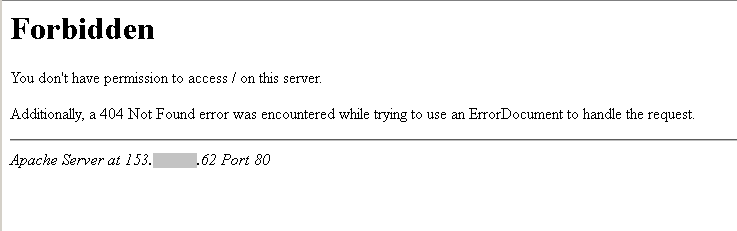
ちょっとF5を押すとこのように返してくれます٩(๑❛ᴗ❛๑)۶
※弊社公式サイトのサーバーは平和なので未導入、自身のサーバーで導入して試してください。